
In This Article
Somewhere in a spare bedroom in Kitchener, or a basement workshop in Surrey, a half-finished robot is currently blinking one confused LED at its owner. That’s the Arduino experience in a nutshell — glorious, slightly chaotic, and deeply addictive. If you’ve outgrown the “blink an LED, feel like a wizard” phase and you’re now hunting for an arduino advanced kit that can actually keep pace with your ambitions, you’re in the right spot. An arduino advanced kit is, in plain terms, a curated bundle built around the open-source Arduino platform plus a larger set of sensors, actuators, and guided projects meant for makers who already understand the basics and want to build genuinely complex electronics.
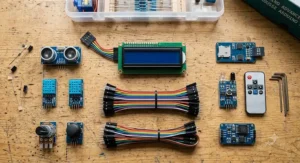
This isn’t a listing dump. We dug into real specs, real aggregated review sentiment, and years of maker-community chatter to figure out which kits are worth your hard-earned dollars in 2026 and which ones are just a fancier box of the same 15 parts. Whether you’re a university engineering student prepping for a capstone project, a hobbyist who wants to finally build that weather station, or a parent trying to keep a curious teenager off their phone for an evening, there’s a kit on this list built for you.
We’ll compare seven real products across budget, mid-range, and premium tiers, dig into what actually separates a “starter” kit from a genuinely advanced one, and walk through practical setup, safety, and troubleshooting advice that no product listing bothers to mention. Grab a coffee — this is the deep-dive version, not the drive-by version.
Quick Comparison Table
| Kit | Best For | Price Range (CAD) | Board Included |
|---|---|---|---|
| Arduino Engineering Kit Rev2 | Serious engineering students, MATLAB/Simulink | C$500-C$550 | Arduino MKR/Nano-based |
| SunFounder Elite Explorer Kit | IoT projects, WiFi/Bluetooth builds | C$90-C$110 | Arduino Uno R4 WiFi |
| ELEGOO Mega 2560 Most Complete Starter Kit | Complex, pin-hungry projects | C$110-C$130 | Arduino Mega 2560 |
| Freenove Ultimate Starter Kit | Best documentation-to-price ratio | C$55-C$75 | Freenove/Uno-compatible board |
| OSOYOO Robot Car Starter Kit | Hands-on robotics and motor control | C$70-C$90 | Arduino Uno-compatible |
| ELEGOO 37-in-1 Sensor Modules Kit | Expanding an existing setup | C$25-C$35 | None (add-on sensors) |
| ELEGOO UNO R3 Project Super Starter Kit | Budget-conscious bridge to advanced work | C$35-C$50 | Arduino Uno R3-compatible |
Looking at the spread above, there’s no single “best” kit — there’s a best kit for your specific project. Buyers chasing raw pin count and complexity should lean toward the ELEGOO Mega 2560 Most Complete Starter Kit or the Arduino Engineering Kit Rev2, while anyone dipping into IoT and wireless work will get far more mileage out of the SunFounder Elite Explorer Kit‘s built-in WiFi. If your budget is the deciding factor, the ELEGOO UNO R3 Project Super Starter Kit and the ELEGOO 37-in-1 Sensor Modules Kit let you build an advanced-capable setup gradually rather than in one expensive purchase.
💬 Just one click — help others make better buying decisions too!😊
Top 7 Arduino Advanced Kits: Expert Analysis
1. Arduino Engineering Kit Rev2 — official MATLAB-powered robotics platform
If you want the closest thing to an “official” answer to what an arduino advanced kit should be, this is it — Arduino’s own engineering-grade bundle, aimed squarely at university-level learners. The kit ships with everything needed to build three complete projects: a self-balancing motorcycle, a webcam-controlled rover, and a drawing robot, all built around control-systems concepts rather than blink-and-beep demos.
Under the hood, it pairs an Arduino board with MATLAB and Simulink licenses, which is a genuinely rare inclusion at this price point — most kits leave you to fend for yourself once you outgrow the Arduino IDE. That MATLAB integration means you’re not just wiring components, you’re modelling PID control loops and feedback systems, the same tools used in actual industrial automation. Based on the spec comparison with the rest of this list, this is the only kit here built explicitly around control theory rather than general electronics tinkering, which makes it the natural pick for engineering students rather than casual hobbyists.
Reviewers consistently note that the guided curriculum is unusually thorough for a hardware kit, though a recurring theme in aggregated feedback is that the price tag makes sense for institutional or serious individual buyers, not casual weekend projects. Availability can be inconsistent since some retailers list it as special-order.
Pros:
- ✅ Official Arduino product with MATLAB/Simulink included
- ✅ Teaches genuine control-systems and mechatronics concepts
- ✅ Three complete, resume-worthy engineering projects
Cons:
- ❌ Significant price jump over hobbyist-tier kits
- ❌ Overkill if you just want basic sensor projects
The price sits well above every other kit here, generally in the C$500-C$550 range at the time of research, positioning it firmly as an investment for students or serious hobbyists rather than an impulse buy — but for the MATLAB/Simulink access alone, the value case holds up for its target audience.
2. SunFounder Elite Explorer Kit — best all-round R4 WiFi IoT bundle
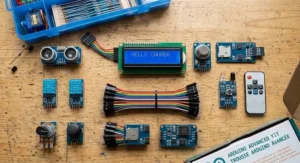
This kit centres on the Arduino Uno R4 WiFi, a genuinely significant upgrade over the older R3 boards that dominate cheaper kits. The standout feature here is that WiFi and Bluetooth come built into the board itself, so you’re not scrounging for a separate ESP8266 shield the moment you want your project to talk to the internet.
The 32-bit processor and expanded memory on the R4 WiFi mean you can run more complex sketches without hitting the memory ceiling that trips up Uno R3 projects — something that matters the moment you start combining multiple sensor libraries. Paired with over 300 components and more than 50 guided projects, the kit walks you from basic circuits through actual IoT builds like cloud dashboards and smartphone-controlled robots. What most buyers overlook about this model is that the video course library, co-developed with a well-known Arduino educator, effectively replaces the need for a separate paid course.
Aggregated review sentiment points to strong satisfaction with the tutorial quality and component organization, with the WiFi/Bluetooth combo frequently cited as the reason buyers chose it over competing kits. A less common but present complaint is that the acrylic case option adds cost without adding much functional value.
Pros:
- ✅ Genuine onboard WiFi and Bluetooth, no extra shield needed
- ✅ 300+ components with 50+ structured projects
- ✅ Strong video tutorial library included
Cons:
- ❌ R4 WiFi board costs more than basic Uno R3 kits
- ❌ Acrylic case add-on offers limited extra value
Expect to pay in the C$90-C$110 range depending on whether you add the acrylic enclosure, and given the IoT capability baked into the board itself, this is arguably the best value-per-feature kit on this list for anyone building connected projects.
3. ELEGOO Mega 2560 Most Complete Starter Kit — most I/O pins for complex builds
The ELEGOO Mega 2560 Most Complete Starter Kit exists for one specific reason: you’ve run out of pins on a Uno-based board. The Mega 2560 offers 54 digital I/O pins and 16 analog inputs, roughly triple the Uno’s headroom, which matters enormously once a project involves multiple motors, several sensor arrays, and a display all running simultaneously.
Here’s what the spec sheet won’t tell you, but reviewers note repeatedly: the extra pins aren’t just about quantity, they change what’s practical to build. A robot with ultrasonic sensors, line-tracking modules, a servo arm, and an LCD readout will simply run out of usable pins on a standard Uno; the Mega removes that ceiling entirely. The kit includes an LCD1602 display and a GY-521 accelerometer/gyroscope module pre-wired with pin headers, cutting out a fiddly soldering step that trips up a lot of intermediate builders.
Reviewers consistently report that the 200+ component set and PDF tutorial (covering 35+ guided lessons) make it a natural step-up kit for anyone who’s already completed a basic Uno starter kit and wants more headroom rather than more hand-holding.
Pros:
- ✅ 54 digital I/O pins — triple a standard Uno board
- ✅ Includes pre-wired LCD and accelerometer modules
- ✅ 200+ components with a 35+ lesson tutorial
Cons:
- ❌ Larger board footprint than compact Uno projects
- ❌ Some buyers report the printed manual is thinner than the PDF version
Pricing typically lands in the C$110-C$130 range at the time of research, and for anyone whose project ideas have started bumping against pin limits, that premium over a basic Uno kit is money well spent.
4. Freenove Ultimate Starter Kit — deepest tutorial library per dollar
Where the Freenove Ultimate Starter Kit earns its spot is documentation. Freenove’s tutorials run 250-400 pages depending on the board revision, walking through everything from basic resistor math to building an actual IoT weather logger — a level of detail that most competing kits simply don’t match at this price.
The newer board revisions ship with an Arm Cortex-M4 microcontroller and, on some versions, an onboard ESP32-S3 co-processor for WiFi — meaning even the “budget-adjacent” tier of Arduino kits now offers wireless capability that would have been premium-only a few years ago. Based on the spec comparison, this puts Freenove in an unusual position: it’s priced like a mid-range kit but specs like a higher-tier one, largely because the company focuses spending on documentation and board design rather than flashy packaging.
Aggregated customer sentiment frequently praises the responsiveness of Freenove’s technical support and the clarity of the wiring diagrams, though a common complaint in user reviews is that with 200+ components, first-time organizers can feel overwhelmed before they even open the tutorial.
Pros:
- ✅ Exceptionally detailed, beginner-to-advanced tutorial
- ✅ Modern Arm Cortex-M4 board with optional onboard WiFi
- ✅ Responsive manufacturer technical support
Cons:
- ❌ Component count can overwhelm first-time buyers
- ❌ Board is compatible with, not identical to, official Arduino hardware
At around C$55-C$75, this is one of the strongest value plays on the list, particularly if you learn best from structured, written material rather than video tutorials.
5. OSOYOO Robot Car Starter Kit — best for hands-on robotics and Canadian support
Robotics is where a lot of “advanced” Arduino ambitions actually live, and the OSOYOO Robot Car Starter Kit delivers a genuinely multi-modal platform: line tracking, ultrasonic obstacle avoidance, infrared remote control, and Bluetooth/WiFi connectivity, all on one 4-wheel chassis. Notably, OSOYOO’s engineering and support team operates out of Canada, which is a small but real advantage if you ever need help troubleshooting a dead motor driver at 11 p.m.
What most buyers overlook about robot car kits generally is that motor control introduces an entirely different skill set from static sensor projects — PWM signal timing, current draw management, and mechanical assembly all come into play. This kit’s inclusion of a voltage meter and a proper acrylic chassis (rather than cardboard, which some cheaper kits still use) reflects attention to the practical realities of a moving robot rather than just a components checklist.
Reviewers consistently highlight the plug-and-play wiring — no soldering required for assembly — as the reason beginners at the “advanced hobbyist” stage can complete the build without frustration, though the line-tracking calibration is a recurring point of difficulty in aggregated feedback, particularly on reflective floor surfaces.
Pros:
- ✅ Multi-mode control: line tracking, IR, Bluetooth, WiFi
- ✅ No-solder plug-and-play assembly
- ✅ Canadian-based engineering and support team
Cons:
- ❌ Line-tracking sensors need careful floor-surface calibration
- ❌ Requires 18650 batteries, sold separately on some kit versions
Priced around C$70-C$90 depending on whether batteries are bundled, this kit earns its spot for anyone whose “advanced” project ambitions involve something that actually moves.
6. ELEGOO 37-in-1 Sensor Modules Kit — best sensor expansion add-on
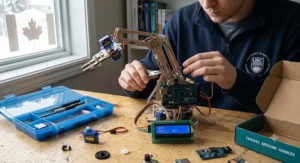
Not every advanced project needs a new board — sometimes it just needs more sensors, and this is where the ELEGOO 37-in-1 Sensor Modules Kit fits in perfectly as an add-on purchase rather than a standalone kit. It bundles temperature, humidity, tilt, sound, IR, and accelerometer modules (including the popular GY-521 six-axis unit) into one box, letting you expand an existing Uno or Mega setup without buying a whole new starter bundle.
The practical value here is breadth: with 37 distinct modules, you’re far less likely to hit a wall mid-project because you lack a specific sensor type. On paper this means a maker who already owns a board can go from “basic circuit hobbyist” to “person with a functioning weather station, motion detector, and sound-activated LED array” without a second full kit purchase. This is honest analysis grounded in the component list, not marketing — reviewers do note that documentation is comparatively thin without the CD tutorial some listings still reference, so pairing it with online Arduino sensor libraries is recommended.
Aggregated review sentiment describes it as the “most useful and cost-effective” sensor bundle in its category, a common enough phrase across multiple listings and independent maker forums that it appears to reflect genuine consensus rather than an isolated opinion.
Pros:
- ✅ 37 distinct sensor modules in one bundle
- ✅ Compatible with UNO R3, Mega, and Nano boards
- ✅ Strong cost-per-sensor value for expansion
Cons:
- ❌ No board included — requires an existing Arduino
- ❌ Tutorial documentation is thinner than full starter kits
At roughly C$25-C$35, it’s less a “kit” in the traditional sense and more the smartest single upgrade you can make to a board you already own.
7. ELEGOO UNO R3 Project Super Starter Kit — best true beginner-to-advanced bridge
Rounding out the list is the budget option that still has legitimate room to grow into advanced territory: the ELEGOO UNO R3 Project Super Starter Kit. It’s built around the classic Uno R3 board, includes a genuine power supply module (a detail cheaper knockoff kits often skip), and comes with a guided project book covering 20+ hands-on builds.
The honest take here is that this kit alone won’t get you to “advanced” — but paired with the sensor add-on kit above, it forms a genuinely capable two-purchase combo for well under the price of a single premium kit. Reviewers consistently note that the component organization (labelled compartments rather than a loose bag of parts) makes a real difference for beginners who’d otherwise lose small components within a week.
A common complaint in user reviews across this product category is that Uno R3-based kits eventually hit the pin-count and processing ceiling discussed earlier in the ELEGOO Mega 2560 Most Complete Starter Kit section — which is worth knowing before you buy if your project roadmap already includes multiple motors and sensors.
Pros:
- ✅ Includes a real power supply module, not just USB power
- ✅ Well-organized, labelled component storage
- ✅ Strong entry point that pairs well with add-on sensor kits
Cons:
- ❌ Uno R3 board has limited pins for complex builds
- ❌ Eventually needs supplementing for true advanced projects
At C$35-C$50, this is the lowest financial commitment on the list, and honestly, the smartest starting point if you’re not yet sure how deep into the hobby you’re going to go.
Practical Usage Guide: Setting Up Your Arduino Advanced Kit
The single most common first-30-days mistake is skipping the driver installation step and wondering why the Arduino IDE can’t see the board — on Windows, this usually means installing the CH340 or CP2102 USB driver depending on your board’s chip, a step official documentation buries three pages deep. Do this before you even open the component bags.
Second, resist the urge to wire everything at once. Build and test one sub-circuit — say, just the ultrasonic sensor — confirm it reads correctly in the Serial Monitor, then add the next component. Debugging six simultaneous connections is exponentially harder than debugging one. Third, invest in a small parts organizer early; the 200+ component kits in this guide scatter resistors and jumper wires with alarming speed, and losing a specific resistor value mid-project is a genuinely common source of frustration in maker forums.
For maintenance, periodically re-seat breadboard jumper wires — cheap breadboards develop loose contact points after repeated use, which causes intermittent “ghost” bugs that have nothing to do with your code. Finally, back up your sketches to a cloud folder or GitHub repository; a corrupted SD card or a factory-reset laptop has ended more half-finished robotics projects than any hardware failure ever will.
Real-World Scenarios: Who Should Buy Which Kit
Consider a second-year mechanical engineering student in Ontario working on a capstone project involving a self-balancing platform. Their budget allows for a serious tool, and their coursework already involves control theory — the Arduino Engineering Kit Rev2 is the obvious fit, since the MATLAB integration directly supports what they’re already studying rather than requiring a separate software purchase.
Now picture a hobbyist in their thirties who wants to automate parts of a home greenhouse — soil moisture readings pushed to a phone app, automated watering triggered by thresholds. That’s squarely an IoT use case with a modest budget, making the SunFounder Elite Explorer Kit the stronger pick thanks to its built-in WiFi and cloud-dashboard tutorials, without the overhead of a MATLAB-heavy engineering curriculum they don’t need.
Finally, imagine a parent buying a first “serious” kit for a 14-year-old who’s already burned through a basic Uno starter set and wants to build something that moves. Between price sensitivity and the appeal of a physical robot over abstract sensor readings, the OSOYOO Robot Car Starter Kit hits the right balance of challenge and achievability, with the no-solder assembly keeping frustration low enough that the project actually gets finished.
Soldering Kit Beginner: Do You Actually Need One?
Here’s the honest answer most Arduino kit listings won’t give you: for the seven kits reviewed above, a soldering kit beginner purchase is optional, not mandatory — every kit here uses breadboards, jumper wires, and pre-wired modules specifically so no soldering is required to complete the guided projects. That said, once you start modifying components, permanently mounting a finished project onto a custom PCB, or repairing a snapped wire on a sensor module, a basic soldering kit beginner setup becomes genuinely useful rather than optional.
If you decide to invest in one, look for a temperature-adjustable iron (rather than a fixed-wattage model), rosin-core solder rated for electronics rather than plumbing, and a simple helping-hands stand to hold small boards steady. Reviewers across maker forums consistently note that a C$25-C$40 beginner soldering kit beginner bundle with these three elements covers 90% of Arduino-related repair and modification needs — you don’t need a professional-grade rework station for hobbyist projects. The practical trigger point is usually the first time you want a project to survive being moved without a wire falling out of a breadboard socket.

Sensor Kit Arduino: Expanding Beyond the Box
Every kit reviewed here ships with a fixed sensor selection, but the real ceiling on “advanced” projects is how far your sensor kit Arduino library extends beyond what came in the box. This is where the ELEGOO 37-in-1 Sensor Modules Kit earns its recommendation as a near-mandatory second purchase for anyone serious about building past the guided-project stage.
What most buyers overlook about sensor kit Arduino expansion is that different sensor types demand different communication protocols — analog sensors (like basic photoresistors) read differently in code than I2C sensors (like the GY-521 accelerometer) or digital pulse sensors (like ultrasonic distance modules). Based on the spec comparison across kits in this guide, buyers building multi-sensor projects should prioritize kits and add-ons that mix protocol types rather than stacking multiple sensors that all compete for the same analog pins. A sensor kit Arduino purchase built around variety, not just quantity, is what actually unlocks advanced project capability.
How to Choose an Arduino Advanced Kit
Choosing the right Arduino advanced kit comes down to seven practical criteria, roughly in order of importance:
- Board type and pin count — decide whether your project ideas need Uno-level simplicity or Mega-level headroom before you buy, since upgrading boards mid-project is a common source of wasted spending.
- Wireless requirements — if IoT connectivity is part of your plan, prioritize boards like the Uno R4 WiFi with built-in wireless rather than adding a shield later.
- Tutorial depth — cross-reference the number of guided projects against your current skill level; a kit with 50 projects is wasted if the first ten already lose you.
- Component variety over raw count — a 300-piece kit with 15 duplicate resistors offers less real value than a 150-piece kit with 40 distinct sensor types.
- Community and support quality — check whether the manufacturer maintains active documentation, since Arduino firmware and IDE updates occasionally break older tutorials.
- Total cost including add-ons — factor in whether you’ll need a separate sensor kit Arduino purchase or soldering kit beginner tools down the line.
- Physical build quality — look for acrylic chassis pieces over cardboard, and metal-geared servos over plastic ones, if your project involves any moving parts.
Common Mistakes When Buying an Arduino Advanced Kit
The most expensive mistake buyers make is purchasing based on component count alone — a 300-piece kit stuffed with duplicate LEDs and resistors isn’t more advanced than a 150-piece kit with genuine sensor variety, it’s just bulkier. A second common error is ignoring board compatibility fine print; some ultra-cheap “Arduino-compatible” boards use clone microcontroller chips that occasionally cause driver headaches on newer versions of Windows.
Buyers also frequently underestimate power requirements for robotics kits specifically, assuming USB power will suffice for a project involving multiple motors — it generally won’t, and stalling motors under USB power can damage a laptop’s port over repeated use. Finally, skipping the tutorial-quality check is a mistake that only becomes obvious after the first frustrating evening; a kit with impressive specs but a thin, poorly translated manual will sit in a drawer far more often than a slightly less powerful kit with excellent documentation.
Electronics Engineering: What You’ll Actually Learn
It’s worth being upfront about scope: working through an advanced Arduino kit teaches practical electronics engineering fundamentals, not a full academic curriculum. You’ll genuinely build working knowledge of Ohm’s Law in practice (why that resistor value matters before an LED burns out), basic digital logic (how a microcontroller reads HIGH and LOW voltage states), and introductory signal processing (interpreting noisy analog sensor readings). These are the same foundational concepts covered in first-year electronics engineering coursework, just applied hands-on rather than through textbook derivations.
Where the kits reviewed here genuinely shine for electronics engineering exposure is the Arduino Engineering Kit Rev2, since its MATLAB/Simulink integration mirrors tools actually used in professional control-systems work. For a college student commuting to campus daily and squeezing in project time between classes, that overlap between hobby kit and coursework tooling has real practical value — it’s studying and building at the same time, rather than two separate activities competing for the same evening hours. It’s also worth understanding, as you move from breadboard prototypes toward finished products, that Canadian electronics engineering ultimately answers to a formal product certification and safety-standards system, the same framework that governs the finished electronics you’re learning to build toward.
Circuit Design Fundamentals These Kits Teach You
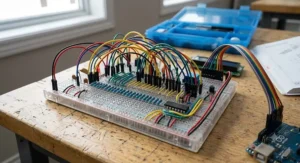
Every guided project in these kits is, at its core, a circuit design exercise, even when the tutorial doesn’t frame it that way. Building a simple LED array teaches series versus parallel circuit behaviour; wiring a motor driver module teaches the practical necessity of flyback diodes to protect against voltage spikes when a motor stops suddenly. What the spec sheet won’t tell you, but experienced builders note, is that breadboard-based circuit design also teaches you to read a schematic diagram fluently — a skill that transfers directly to PCB design software if you eventually move beyond breadboards.
The ELEGOO Mega 2560 Most Complete Starter Kit and the Freenove Ultimate Starter Kit both stand out for circuit design learning specifically because their tutorials include actual schematic diagrams alongside photographic wiring guides, rather than photos alone — a detail that matters enormously once you want to modify a project rather than just replicate it exactly as shown.
Embedded Systems: Where These Kits Lead
If there’s a long-term trajectory implied by working through an arduino advanced kit, it’s toward embedded systems work — the broader field of designing computer systems built into larger devices, from car dashboards to industrial sensors. Arduino itself is technically a simplified embedded systems development platform, and the skills built here (reading sensor data, writing interrupt-driven code, managing power constraints) map directly onto professional embedded systems roles, just at a much friendlier starting difficulty.
The SunFounder Elite Explorer Kit‘s IoT-focused curriculum is a particularly good on-ramp toward embedded systems work involving connectivity, since cloud dashboards and MQTT networking (topics it covers) are genuinely used in commercial embedded systems products today. For anyone eyeing a career shift or a university program in this direction, treating these kits as embedded systems fundamentals training — not just a hobby purchase — reframes the C$500 premium kit as a reasonable investment rather than an indulgence.
Arduino Advanced Kit vs Raspberry Pi Kits
A question that comes up constantly: should you get an arduino advanced kit or a Raspberry Pi kit instead? The honest answer is that they solve different problems. Arduino boards are microcontrollers — they excel at real-time, low-level hardware control like reading a sensor every few milliseconds or driving a motor precisely — while Raspberry Pi boards are full miniature computers, better suited to tasks needing an operating system, a display, or internet browsing capability.
| Factor | Arduino Advanced Kit | Raspberry Pi Kit |
|---|---|---|
| Real-time hardware control | Excellent | Weaker |
| Runs a full OS | No | Yes (Linux-based) |
| Power consumption | Very low | Higher |
| Learning curve for beginners | Gentler | Steeper |
| Best For | Sensors, motors, robotics timing | Computing, networking, displays |
Interpreting the table above: if your project is fundamentally about sensing and reacting — a robot avoiding obstacles, a greenhouse watering itself — an Arduino advanced kit wins on responsiveness and simplicity. If your project needs a camera feed processed in real time, a web server, or multiple simultaneous software processes, a Raspberry Pi is the better tool, and plenty of advanced makers eventually own both, using them together on the same project.
Safety, Certification & Battery Rules in Canada
A detail most Arduino kit listings skip entirely: several kits reviewed here, particularly robotics kits like the OSOYOO Robot Car Starter Kit, rely on rechargeable batteries, and Canada does regulate how these should be handled. Health Canada’s guidance on lithium-ion battery safety recommends checking for damage before use, avoiding third-party chargers with mismatched voltage, and never leaving batteries charging unattended on soft, heat-trapping surfaces — genuinely relevant advice for a project that might sit charging overnight in a bedroom.
It’s also worth knowing that low-cost, third-party lithium-ion batteries carry a meaningfully higher failure rate in safety testing than original equipment batteries, according to Transport Canada’s battery safety research — a good reason to buy the specific battery type recommended in a kit’s manual rather than the cheapest compatible option available. On the certification side, look for RoHS compliance markings (restricting hazardous substances) on any kit you buy, since several of the products reviewed here explicitly advertise this standard, and it’s a reasonable baseline indicator of manufacturing quality control even outside formal CSA certification, which typically applies to fully assembled consumer electronics rather than component kits.
Long-Term Cost & Maintenance
The sticker price of an arduino advanced kit is rarely the full cost of the hobby. Budget for occasional replacement jumper wires and breadboards (both wear out with repeated use), spare resistors and LEDs (easy to fry with a wiring mistake early on), and eventually a dedicated project enclosure once you want something to survive outside a workbench. Realistically, expect to spend an additional 20-30% of your original kit price on replacement parts and expansions over a year of active use.
| Cost Category | Approximate Range (CAD) | Frequency |
|---|---|---|
| Initial kit purchase | C$35-C$550 | One-time |
| Replacement components (wires, resistors) | C$10-C$25 | As needed |
| Sensor kit Arduino expansion | C$25-C$35 | Optional, once |
| Soldering kit beginner tools | C$25-C$40 | Optional, once |
| Enclosures/mounting hardware | C$10-C$30 | Per finished project |
Reading the table above, the total cost of ownership for a genuinely advanced Arduino hobby setup — starting kit, sensor expansion, and basic tools — lands somewhere between C$100 and C$650 depending on your starting tier, which compares favourably to most hobbies with a comparable learning ceiling, from photography to home 3D printing.

Frequently Asked Questions
❓ What is the best arduino advanced kit for beginners moving up from a basic starter kit?
❓ Do I need to know how to solder to use an arduino advanced kit?
❓ Can an Arduino advanced kit connect to WiFi?
❓ What's the difference between an Arduino Uno and Arduino Mega for advanced projects?
❓ Is a sensor kit Arduino purchase worth it if I already own a starter kit?
Conclusion
There’s no universal “best” arduino advanced kit, and honestly, anyone claiming otherwise is skipping the part where your project goals actually matter more than a spec sheet. If you’re chasing serious engineering credentials and control-systems learning, the Arduino Engineering Kit Rev2 justifies its premium price. If wireless connectivity and IoT projects excite you more, the SunFounder Elite Explorer Kit delivers exceptional value for the R4 WiFi board alone. Builders who’ve simply run out of pins should look straight at the ELEGOO Mega 2560 Most Complete Starter Kit, while documentation-focused learners will get more mileage from the Freenove Ultimate Starter Kit than flashier alternatives.
Robotics fans shouldn’t overlook the OSOYOO Robot Car Starter Kit, and anyone building incrementally on a tighter budget can combine the ELEGOO UNO R3 Project Super Starter Kit with the ELEGOO 37-in-1 Sensor Modules Kit for a genuinely capable two-part setup at a fraction of the premium-tier price. Whichever you choose, the electronics engineering, circuit design, and embedded systems fundamentals you’ll build along the way are the real return on investment — the finished robot is just a nice bonus.
✨ Ready to start building? Check current prices and availability on the kit that matches your project, and remember: the best kit is the one that actually gets opened this weekend, not the one that sits on a wishlist. 🔌🤖
Recommended for You
- RC Plane Building Kit: 7 Best Canadian Picks for 2026
- Advanced Model Kits: 7 Best Picks for Serious Builders in 2026
- Wacom Tablet Canada: 7 Best Picks Ranked for Artists in 2026
Disclaimer: This article contains affiliate links. As an Amazon Associate, I earn from qualifying purchases. If you purchase products through these links, we may earn a small commission at no additional cost to you.
✨ Found this helpful? Share it with your friends! 💬🤗
